How to Integrate OpenAI API with Laravel: A Step-by-Step Tutorial
-
- by Fiaz Ahmad
- June 6, 2026
- in AI for Developers

Introduction
Building intelligent sales tools no longer requires a dedicated AI team or a massive infrastructure budget. In 2026, PHP developers can integrate OpenAI API with Laravel in a matter of hours and deploy fully functional AI lead generation agents that qualify prospects, draft outreach messages, and route high-value contacts automatically. This tutorial walks you through the complete process, from package installation to building a working lead qualifier, with production-grade practices baked in from the start.
Laravel has become one of the most capable frameworks for AI-powered applications, and the reason is straightforward: it already solves the hard surrounding problems. Job queues, authentication, database abstraction, API orchestration. Pair that backbone with OpenAI’s language models, and you get a backend that can reason about lead data the way a senior sales rep would.
Why Laravel Is the Right Framework to Build AI Apps
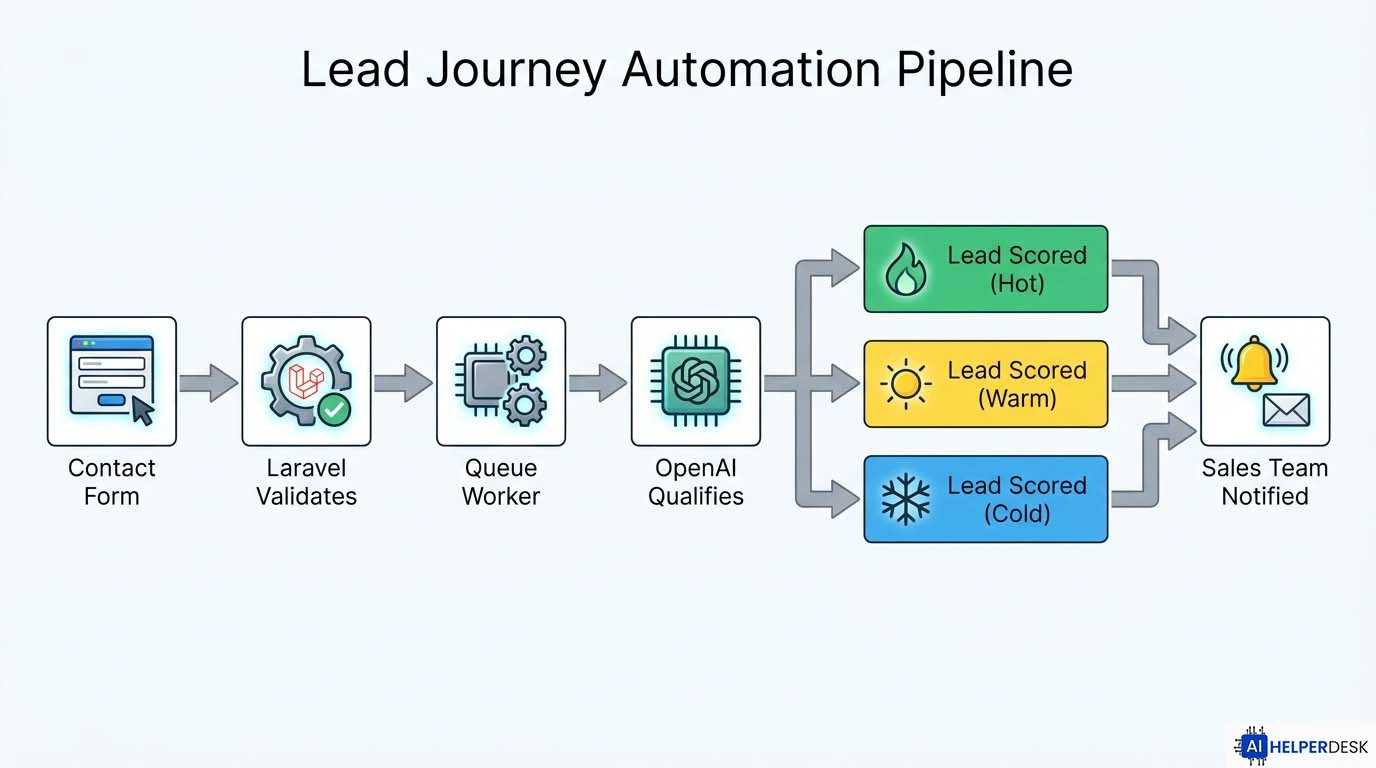
Most AI tutorials show a single API call in isolation. That is not how real applications work. A strong OpenAI integration is rarely just one call from a controller. A realistic workflow looks like this: a visitor submits a contact form, Laravel validates and stores the submission, a queue worker picks it up, OpenAI scores and enriches the lead, and the application notifies the sales team or kicks off a follow-on workflow.
Laravel handles every layer of that pipeline natively. That is the core reason to build AI apps with Laravel rather than reaching for a standalone Python microservice.
Beyond architecture, the numbers make a compelling case. By 2026, AI-powered agents are projected to handle up to 95% of customer interactions, delivering fast, personalized support around the clock. More directly relevant to lead generation pipelines, 82% of consumers now prefer an immediate response from a chatbot over waiting for a human, and 96% feel that businesses using chatbots are genuinely committed to good service. Teams that automate initial lead qualification are not cutting corners. They are meeting buyer expectations head on.
Prerequisites
Before starting the Laravel AI integration tutorial, confirm you have the following in place.
PHP 8.3 or higher is required for Laravel 13, which is the current stable release as of March 2026. You will also need Composer, a working Laravel 12 or 13 installation, a MySQL or PostgreSQL database, and an active OpenAI account. If you are still on Laravel 11, the openai-php/laravel package works there too, but upgrading to Laravel 13 gives you access to the first-party Laravel AI SDK out of the box. If you want to compare approaches before committing to a full-stack build, the Developer’s Guide to Building Custom AI Agents: Low-Code vs Full-Stack covers the architectural trade-offs in useful detail.
Step 1: Install the OpenAI PHP Client for Laravel
Install the package via Composer, then run the artisan install command to generate the configuration file.
composer require openai-php/laravel
php artisan openai:install
This creates a config/openai.php file in your project and appends blank environment variables for the API key and organization ID to your .env file. No manual service provider registration is needed. Laravel auto-discovers the package and handles the rest.
Step 2: Configure Your API Key Securely
Open your .env file and add your credentials. Never hardcode secrets in source files.
OPENAI_API_KEY=sk-your-key-here
OPENAI_ORGANIZATION=org-your-org-id-here
To get your API key, head to platform.openai.com, sign in, navigate to API Keys in the left sidebar, and click “Create new secret key.” Copy it immediately since OpenAI only shows it once.
Run php artisan config:clear after saving the file. Your application is now authenticated and ready to make API calls.
Step 3: Create the Lead Model and Migration
Your lead generation agent needs somewhere to store qualified contacts. Generate the model and migration together.
php artisan make:model Lead -m
Open the migration file and define the schema.
Schema::create('leads', function (Blueprint $table) {
    $table->id();
    $table->string('name');
    $table->string('email');
    $table->text('message');
    $table->integer('score')->nullable();
    $table->string('category')->nullable(); // hot, warm, cold
    $table->text('ai_summary')->nullable();
    $table->timestamps();
});
Run the migration.
php artisan migrate
Step 4: Build the AI Lead Qualification Service
Create a dedicated service class so the AI logic stays decoupled from your controllers. This matters a lot for testability and long-term maintenance.
php artisan make:class Services/LeadQualificationService
Open app/Services/LeadQualificationService.php and write the qualification logic.
<?php

namespace App\Services;

use OpenAI\Laravel\Facades\OpenAI;

class LeadQualificationService
{
    public function qualify(array $lead): array
    {
        $prompt = <<<EOT
You are a B2B sales qualifier. Analyze this lead submission and return a JSON object with three keys:
- score: integer from 1 to 10 (10 = highest intent)
- category: one of "hot", "warm", or "cold"
- summary: one sentence explaining your reasoning

Lead data:
Name: {$lead['name']}
Email: {$lead['email']}
Message: {$lead['message']}

Return only valid JSON. No explanation outside the JSON object.
EOT;

        $response = OpenAI::chat()->create([
            'model'    => 'gpt-5.4-mini',
            'messages' => [
                ['role' => 'user', 'content' => $prompt],
            ],
            'max_tokens' => 200,
        ]);

        $content = $response->choices[0]->message->content;

        return json_decode($content, true) ?? [
            'score'    => 5,
            'category' => 'warm',
            'summary'  => 'Unable to parse AI response.',
        ];
    }
}
Using gpt-5.4-mini keeps token costs low for high-volume qualification pipelines. It is OpenAI’s current recommended model for latency-sensitive, cost-optimized workloads as of mid-2026, and it significantly outperforms the retired gpt-4o-mini on instruction following and structured output reliability. For complex reasoning tasks, gpt-5.5 is OpenAI’s current flagship API model, but for a lead qualifier running on every form submission, gpt-5.4-mini hits the right balance. Always verify model names against OpenAI’s official models reference before deploying, since the model catalogue evolves quickly. Note that gpt-4o-mini was retired in early 2026 and is no longer available on most deployment platforms.
Step 5: Create the Lead Controller
Generate the controller and wire in the service.
php artisan make:controller LeadController
<?php

namespace App\Http\Controllers;

use App\Models\Lead;
use App\Services\LeadQualificationService;
use Illuminate\Http\Request;

class LeadController extends Controller
{
    public function __construct(
        private LeadQualificationService $qualifier
    ) {}

    public function store(Request $request)
    {
        $validated = $request->validate([
            'name'    => 'required|string|max:255',
            'email'   => 'required|email',
            'message' => 'required|string|max:2000',
        ]);

        $result = $this->qualifier->qualify($validated);

        $lead = Lead::create([
            'name'       => $validated['name'],
            'email'      => $validated['email'],
            'message'    => $validated['message'],
            'score'      => $result['score'],
            'category'   => $result['category'],
            'ai_summary' => $result['summary'],
        ]);

        return response()->json([
            'message'  => 'Lead received and qualified.',
            'lead_id'  => $lead->id,
            'score'    => $result['score'],
            'category' => $result['category'],
        ], 201);
    }
}
Step 6: Register the Route
Open routes/api.php and add the endpoint.
use App\Http\Controllers\LeadController;

Route::post('/leads', [LeadController::class, 'store']);
You can now POST a JSON payload to /api/leads and get a qualified lead score back in the response.
Step 7: Move Heavy Processing to a Queue
Calling the OpenAI API synchronously on every form submission will slow down your user-facing response times under load. The fix is straightforward: move the qualification step to a background job.
php artisan make:job QualifyLead
<?php

namespace App\Jobs;

use App\Models\Lead;
use App\Services\LeadQualificationService;
use Illuminate\Contracts\Queue\ShouldQueue;
use Illuminate\Foundation\Queue\Queueable;

class QualifyLead implements ShouldQueue
{
    use Queueable;

    public function __construct(public Lead $lead) {}

    public function handle(LeadQualificationService $qualifier): void
    {
        $result = $qualifier->qualify([
            'name'    => $this->lead->name,
            'email'   => $this->lead->email,
            'message' => $this->lead->message,
        ]);

        $this->lead->update([
            'score'      => $result['score'],
            'category'   => $result['category'],
            'ai_summary' => $result['summary'],
        ]);
    }
}
Dispatch the job from the controller instead of calling the qualifier directly.
QualifyLead::dispatch($lead);
Run the queue worker to process jobs.
php artisan queue:work
Key Statistics and Insights
The business case for this type of integration is well supported by current data. Generative AI technology is expected to contribute between $2.6 trillion and $4.4 trillion annually to global GDP by 2030 across multiple industries. At the team level, reported benefits of agentic AI in production include greater staff efficiency (61%), enhanced customer service (48%), cost reductions (56%), and increased business growth (48%).
For development teams specifically, Laravel 13, released on March 17, 2026 at Laracon EU, graduates the Laravel AI SDK from experimental to a fully production-stable, first-party component of the framework. The SDK brings OpenAI, Anthropic, Google Gemini, Groq, xAI, DeepSeek, and other providers under one unified API. Switching providers is a single environment variable change, and automatic failover means if OpenAI hits a rate limit, requests can fall through to Anthropic instantly.
Real-World Use Cases
B2B SaaS contact forms. Every form submission runs through the qualifier. Hot leads trigger a Slack notification to the sales team. Cold leads enter a nurture sequence automatically. The model reads intent signals in the message text that scoring rules alone would miss.
Event registration filtering. Conference organizers use AI qualification to separate genuine buyers from competitors and students before sending speaker briefings or pricing details.
Agency intake pipelines. Freelancers and agencies receive project enquiries across email, chat, and web forms. An AI agent categorizes requests by budget signals, urgency, and fit before the account manager reads a single word.
Laravel’s official AI SDK documentation demonstrates a lead extractor agent that processes CSV contact form submissions, automatically filters out spam, identifies high-value prospects such as Series B startups, and extracts specific needs for routing. The queued job pattern shown in this tutorial fits directly into that approach.
Benefits and Opportunities
The primary benefit of this PHP OpenAI client custom code approach is control. Unlike third-party lead scoring tools, every piece of logic lives in your codebase. You can adjust the prompt, swap models, add new fields, and audit every decision in your own database. There are no per-seat licensing costs and no vendor lock-in on the scoring logic itself.
Queue-based processing also means the AI layer scales independently of your web layer. Spin up additional queue workers during high-traffic periods without touching a single line of application code.
And because the qualifier returns structured JSON, the output feeds naturally into downstream automations: CRM writes, email triggers, Slack alerts, and webhook dispatches to external tools.
Risks, Challenges, and Limitations
Prompt reliability is the most common failure point. Language models do not return identical outputs for identical inputs. The JSON parsing fallback in your service class is not optional. Build it, test it, and log every raw response to a database column so you can audit exactly what the model returned when a lead was miscategorized.
Token costs accumulate quickly at scale. gpt-5.4-mini is priced competitively for high-volume pipelines, but qualification prompts running on every form submission will still produce measurable monthly costs at thousands of leads per day. For your lowest-priority submissions, consider gpt-5.4-nano, which is available via the API and is designed specifically for ultra-lightweight inference. Monitor token usage from day one and consider batching low-priority submissions.
Rate limits are also a real constraint for high-volume pipelines. Laravel’s queue backpressure mechanisms handle this well, but any job calling a third-party API should implement retry logic with exponential backoff. The OpenAI API documentation covers rate limit tiers and recommended handling patterns in full.
Data privacy deserves explicit planning. Sending prospect contact data to a third-party API means that data leaves your infrastructure. Review your privacy policy, assess GDPR or applicable local obligations, and decide whether lead messages need to be anonymized or truncated before they reach the model.
Expert Analysis
The real opportunity in this integration is not the technology itself. It is the compounding advantage that AI qualification creates over time. Every lead that passes through the system produces a scored record. Over weeks and months, that dataset reveals which message patterns correlate with conversion, which industries send the highest-intent enquiries, and which lead sources consistently produce cold contacts regardless of volume. That analytical layer is only accessible if the AI output is stored in a structured, queryable format, which is exactly what the schema in Step 3 provides.
Most teams implement AI lead scoring and stop there. The more strategic move is to treat the AI output as a training signal. Review miscategorized leads weekly. Refine the prompt. Add domain-specific language that reflects your actual ideal customer profile. The model is not a static tool. It responds to better instructions the way a new hire responds to better onboarding.
There is also a meaningful architectural decision embedded in choosing to integrate OpenAI API with Laravel rather than using a dedicated AI platform. Laravel handles authentication, validation, permissions, background jobs, notifications, storage, and API orchestration exceptionally well. It gives structure to the entire process instead of treating AI as a disconnected side feature. Teams that bolt AI onto an existing product via webhooks to an external service lose that structural integrity. The queue-based approach built here keeps AI as a first-class citizen of the application, not an afterthought.
Laravel’s AI SDK now supports sub-agents, allowing agents to be handed off as tools to other agents and turning the SDK into a proper orchestration layer. For teams building beyond basic qualification, this is the direction to grow toward: a parent agent that receives a lead, delegates company research to one sub-agent, delegates email drafting to another, and synthesizes both outputs before routing.
Future Outlook
OpenAI’s Responses API is now the recommended foundation for modern agentic workflows, while the legacy Assistants API has been deprecated and is scheduled to shut down on 26 August 2026. Teams building new Laravel AI integrations today should avoid the Assistants API entirely and build on the Responses API or the unified Laravel AI SDK. OpenAI’s current flagship API model is gpt-5.5, available since April 2026, while gpt-5.4-mini and gpt-5.4-nano serve cost-optimized, high-throughput workloads.
The broader trajectory is toward multi-agent pipelines where lead qualification is one node in a larger automated workflow, not a terminal endpoint. Laravel 13’s first-party AI SDK already ships with structured output support, sub-agent delegation, provider-agnostic routing, and automatic failover between providers. This is a production-ready orchestration layer, not an experimental add-on.
For developers who want to explore the architectural decisions behind agentic systems before extending this tutorial, the Developer’s Guide to Building Custom AI Agents: Low-Code vs Full-Stack offers a grounded comparison of implementation strategies across the complexity spectrum.
Conclusion
To integrate OpenAI API with Laravel for AI lead generation is to add a reasoning layer to an already robust web framework. The steps in this tutorial cover the full production path: package installation, secure key management, schema design, a dedicated service class, controller wiring, and asynchronous queue processing. Each piece has a specific job, and keeping them separated makes the system maintainable as your qualification logic grows.
The real advantage this architecture delivers is not a faster contact form. It is a systematic way to turn unstructured prospect messages into actionable sales intelligence, stored in your own database, auditable at any time, and improvable with each iteration of your prompt. That compound improvement is what separates teams using AI tactically from those building a genuine competitive capability.
Start with the basic qualifier. Run it against real leads. Review the edge cases. Refine the prompt. Then extend: add outreach drafting, CRM sync, or a sub-agent that researches the prospect’s company before the score is finalized. The foundation built here supports all of it.
External references: OpenAI API Documentation | openai-php/laravel on Packagist | Laravel AI SDK Official Docs (Laravel 13)
Frequently Asked Questions
Laravel 13, the current stable release, requires PHP 8.3 or higher. If you are using the openai-php/laravel package on an older Laravel 11 installation, PHP 8.2 is the minimum, but upgrading to Laravel 13 with PHP 8.3 is strongly recommended for access to the first-party Laravel AI SDK and all current framework features. Confirm your server version with php -v before installation.
Yes, and for new projects it is the recommended path. The Laravel AI SDK is now a first-party, production-stable package in Laravel 13, providing a unified interface across OpenAI, Anthropic, Gemini, Groq, xAI, DeepSeek, and more. The openai-php/laravel package remains valid for projects on Laravel 11 or where single-provider simplicity is preferred, but Laravel 13 with the official AI SDK is the current standard for new builds.
Use Laravel queues with retry_after configured in config/queue.php, implement exponential backoff on failed jobs, and consider batching low-priority leads during off-peak hours. Keep an eye on your OpenAI usage dashboard to stay within your tier’s limits.
OpenAI offers data processing agreements for business accounts and does not use API data to train models by default. That said, review your applicable privacy regulations, particularly GDPR if you handle EU resident data, and consider anonymizing or truncating sensitive fields before including them in prompts.
Accuracy depends heavily on prompt quality and the specificity of your ideal customer profile. Models like gpt-5.4-mini significantly outperform rule-based systems on unstructured text signals such as intent language, urgency indicators, and contextual fit. They underperform on deterministic criteria like company size or job title, which are better handled by structured validation rules alongside the AI layer. For higher-stakes qualification decisions, consider upgrading to gpt-5.5 for deeper reasoning.
The openai-php/laravel package includes a testing facade that lets you fake API responses and assert against expected calls. Use OpenAI::fake() in your feature tests to mock qualification responses without incurring API costs or requiring network access.
