10 Best AI Tools for Entrepreneurs to Scale Business Workflows (2026)
-
- by Fiaz Ahmad
- May 20, 2026
- in AI Business Solutions


The Gap Between Busy and Productive Is Getting Bigger
Here’s something most entrepreneurs know but rarely say out loud: working harder isn’t the same as growing faster.
You’re answering emails at midnight. You’re manually moving data between apps. You’re writing the same type of content on repeat, then looking up on a Friday wondering where the week actually went. Meanwhile, some founder with a leaner team is outpacing you because they’ve built smarter systems around themselves.
That’s the exact problem the right AI tools for entrepreneurs are designed to solve.
If you’re exploring broader strategies, our AI Business Solutions hub covers everything from tool selection to implementation.
The numbers already tell the story. A 2025 Thryv survey found that AI adoption among small businesses jumped 41% in a single year, climbing from 39% to 55%. A separate QuickBooks survey found that 68% of U.S. small businesses now use AI on a regular basis as of 2026. The tipping point has passed. The only question now is whether you’re ahead of it or playing catch-up.
This guide breaks down the 10 best AI tools for entrepreneurs in 2026. These are tools that genuinely move the needle on workflow automation, content production, customer management, and business intelligence. No filler, no padding. Just practical picks with real-world use cases behind each one.
What Makes an AI Tool Worth Your Time (and Money)?
Before diving into the list, here’s a quick filter worth keeping in mind. A good AI tool for entrepreneurs should:
- Solve a specific bottleneck, not just look impressive in a demo
- Integrate with the tools you’re already using
- Scale without requiring you to hire a developer to maintain it
- Deliver ROI you can measure in time saved or revenue generated
With that lens in place, let’s get into it.
1. Zapier: The Automation Backbone Every Entrepreneur Needs
Best for: Connecting apps and eliminating repetitive manual tasks
If there’s one tool that shows up on nearly every serious entrepreneur’s stack, it’s Zapier. In 2026, it has moved well beyond basic “if this, then that” logic. The platform now uses natural language processing, so you can type something like: “When a new lead comes in via HubSpot, enrich their data and draft a welcome email in Gmail”, and it builds the workflow for you on the spot.
Zapier connects over 7,000 apps. Its AI Agent layer actively watches your workflow patterns and begins suggesting automations you may not have thought to set up yourself. Entrepreneurs consistently report saving 15 to 20 hours per week just from automating lead qualification, onboarding sequences, and routine data entry.
Real use case: A solo consultant automates their entire client intake process. A form submission triggers a CRM entry, a welcome email, a Notion task, and a Slack notification, all without touching a keyboard.
Pricing: Free tier available; paid plans from $19.99/month
Link: zapier.com
2. ChatGPT Enterprise: The All-Department AI Assistant
Best for: Content drafting, research, customer communication, internal Q&A
ChatGPT Enterprise has grown well beyond “help me write a quick email.” By 2026, it functions as a cross-departmental AI layer. Marketing uses it to draft copy. Ops teams use it to summarize dense reports. Sales reps use it to prep for client calls before they pick up the phone.
What separates the Enterprise version from the standard product is the ability to feed it your company’s internal documents and have it answer questions grounded in your actual business context, not just general internet knowledge. Think of it as onboarding a smart contractor who’s already read your entire operations manual before their first day.
Most teams pair it with automation tools like Zapier to eliminate repetitive cognitive work: drafting proposals, condensing meeting notes, rewriting product descriptions for different audiences and channels.
Real use case: A five-person ecommerce brand generates 30 product descriptions in 20 minutes, then uses a Zapier workflow to push them directly into Shopify.
Pricing: Enterprise pricing varies; ChatGPT Plus starts at $20/month
Link: openai.com/chatgpt/enterprise
3. Notion AI: Your Business Brain in One Place
Best for: Knowledge management, team documentation, strategic planning
Notion has quietly transformed from a note-taking app into something that functions more like a business intelligence platform. The AI layer lets you ask questions across your entire company knowledge base: meeting notes, SOPs, financial summaries, and project plans. The results are genuinely useful, not a search results page.
The real breakthrough is pattern recognition across your documentation. Entrepreneurs are using Notion AI to spot operational inefficiencies, surface recurring issues buried in meeting notes, and identify growth opportunities sitting in data they already owned.
If your team’s knowledge is scattered across 15 different Google Docs and nobody can find what they need, this tool solves that problem quickly.
Real use case: A startup founder asks Notion AI, “What were our top customer complaints in Q1?” and gets a synthesized answer pulled from six months of support call notes. In seconds.
Pricing: AI features available as a $10/member/month add-on
Link: notion.so
4. HubSpot Breeze AI: Smart CRM That Works While You Sleep
Best for: Sales automation, lead nurturing, customer relationship management
HubSpot’s Breeze AI is what CRM software should have always been. It doesn’t just store your customer data. It tells you what to do with it. The system scores leads automatically, predicts which prospects are most likely to convert, flags customers showing churn signals, and drafts personalized follow-up emails based on each contact’s history.
For entrepreneurs who run their own sales process, this is essentially like having a sales analyst working quietly in the background around the clock.
Real use case: A B2B SaaS founder sets up Breeze to automatically enroll new leads into a five-email nurture sequence based on which pricing page they visited. Conversion rates climbed 22% within the first 60 days.
Pricing: Free CRM tier; Breeze AI included in paid Marketing and Sales hubs
Link: hubspot.com
5. n8n: For the Technical Founder Who Wants Total Control
Best for: Custom workflow automation, self-hosted infrastructure, developer-friendly teams
If Zapier is the front door of automation, n8n is the engine room. It’s open-source, self-hostable, and built for teams who want to own their stack without depending on a vendor’s pricing decisions or data policies.
The standout feature is the AI Workflow Builder. Describe what you want in plain English, and n8n scaffolds the entire workflow, including custom JavaScript nodes for logic that no-code tools simply cannot handle. Companies like Vodafone, Zendesk, and Wayfair use it internally. There’s a steeper learning curve than Zapier, but for a technical founder or engineering-led team, the flexibility is genuinely unmatched.
Real use case: A digital agency builds a client reporting automation that pulls data from Google Analytics, formats it using GPT, and emails a branded PDF every Monday morning, with zero manual work involved.
Pricing: Cloud plans from $24/month; self-hosted is free
Link: n8n.io
6. Lindy: The AI Assistant That Actually Runs Operations
Best for: Founders and ops leaders who want an AI teammate, not just another tool
Lindy sits in a different category from most tools on this list. It’s not a traditional automation platform. It operates more like an AI employee. You give Lindy a task in plain language (“Answer inbound support emails using this FAQ doc”), and it handles it 24/7, escalating edge cases to a human when something falls outside its scope.
It connects natively with Gmail, Slack, Google Calendar, CRMs, and even niche platforms like electronic medical records for healthcare-focused startups. For entrepreneurs stretched thin, Lindy absorbs the communication and coordination tasks that quietly consume most of the day.
Real use case: A small agency owner uses Lindy to handle inbound inquiry emails, qualify leads, book calls into Calendly, and notify the team on Slack, saving roughly three hours every day. If you want to see how tools like Lindy fit into a broader setup, our practical guide to AI agents for small businesses walks through exactly that.
Pricing: Free tier available; paid plans from $49.99/month
Link: lindy.ai
7. Make (formerly Integromat): Visual Automation on a Budget
Best for: Entrepreneurs who want powerful automation without Zapier’s price tag
Make’s visual canvas is its biggest differentiator. You can map out complex automations with branching logic, error handling, and multiple conditional paths on a drag-and-drop interface that makes even complicated workflows readable at a glance. It feels more like drawing a flowchart than writing code.
The 2026 AI toolset handles data parsing and transformation particularly well. Need to pull data from a webhook, transform it, run it through an AI model, and push it to three different destinations? Make handles that cleanly. It’s budget-friendly, and there’s a large creator community producing free templates and tutorials that genuinely speed up setup time.
Real use case: An online course creator automates: new student signup → user account creation → onboarding email sequence → CRM tag → Slack channel invite, all within a single Make scenario.
Pricing: Free tier available; paid plans from $9/month
Link: make.com
8. Synthesia: Video Content at Scale, No Camera Required
Best for: Training videos, product demos, international marketing, onboarding content
Video is consistently the highest-converting content format for most businesses. The problem has always been that it’s slow and expensive to produce. Synthesia solves that with AI-generated video. You type a script, choose an avatar, and get a polished-looking video in minutes rather than days.
Entrepreneurs are using it for new hire training modules, sales team product demos, and localized content for global markets. Multilingual support covers 140-plus languages, meaning you can scale content internationally without hiring translators or video crews.
Real use case: A SaaS startup creates a 10-part customer onboarding video series in a single afternoon, cutting their support ticket volume by 30% within the first month of publishing it.
Pricing: Starter plans from $29/month
Link: synthesia.io
9. Microsoft Copilot: AI Built Into Your Daily Work Tools
Best for: Teams already operating inside the Microsoft 365 ecosystem
If your business runs on Word, Excel, Teams, and Outlook, Microsoft Copilot is the path of least resistance for bringing AI into your workflow. It’s embedded directly inside the apps your team already uses daily, which means zero switching costs and a much shorter adoption curve.
The 2026 version added “Researcher” and “Analyst” reasoning agents that perform deep data analysis and surface actionable insights from your existing files. In Teams meetings, it summarizes discussions in real time and drafts follow-up actions. In Excel, it generates formulas and builds charts from plain English prompts. For non-technical teams, this is often the fastest path to extracting real value from AI.
Real use case: A management consultant uses Copilot to condense a 60-page financial report into a five-point executive brief in under two minutes, then generates a comparison chart directly from the underlying data.
Pricing: Microsoft 365 Copilot from $30/user/month
Link: microsoft.com/copilot
10. ClickUp Brain: Project Management With Actual Intelligence
Best for: Teams managing multiple projects, deadlines, and resource allocation
ClickUp Brain takes project management beyond task lists and color-coded boards. It predicts delays before they happen, analyzes team capacity, and suggests workflow optimizations based on your actual historical patterns. Ask it “Which projects are at risk this week?” and it gives you a real answer drawn from your live task data, rather than a generic template.
For entrepreneurs juggling multiple client projects or product development cycles simultaneously, it removes the cognitive overhead of manually keeping track of everything at once.
Real use case: A product team asks ClickUp Brain to redistribute tasks after a developer calls out sick. It reassigns based on current workloads and updates affected deadlines automatically.
Pricing: Free tier available; paid plans from $7/user/month
Link: clickup.com
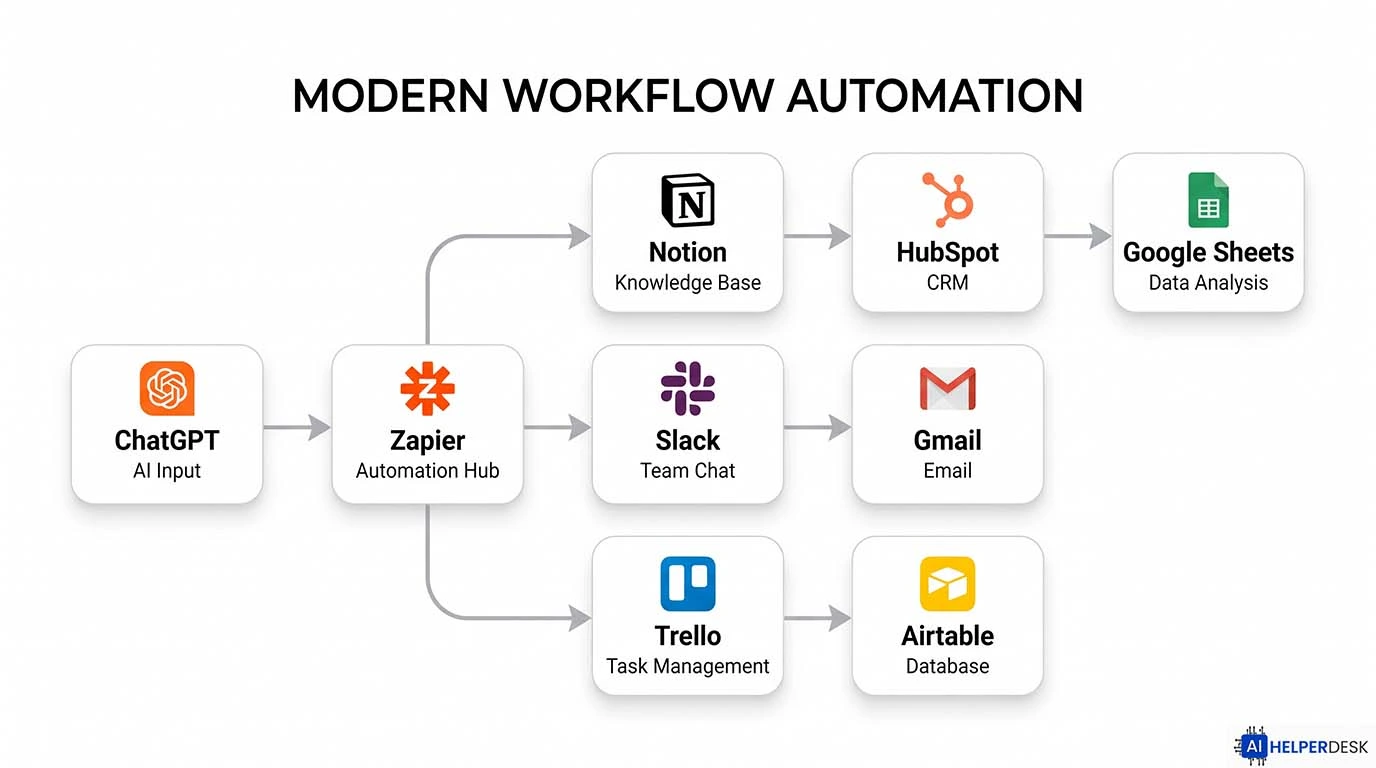
Practical Workflow: How to Stack These Tools
Running all 10 of these simultaneously would create more chaos than it solves. Here’s a practical starting point based on where you are in your business:
Solo founder / Solopreneur: Start with ChatGPT, Zapier, and Notion AI. Together, these three cover content creation, workflow automation, and knowledge management, covering the three biggest time sinks for solo operators, without requiring any technical setup.
Small team (2 to 10 people): Add HubSpot Breeze AI for sales and ClickUp Brain for project management. Layer in Lindy to handle inbound communications and free up your team for higher-value work.
Scaling startup (10-plus people): Look at n8n or Make for custom automation infrastructure, Synthesia for scalable content production, and Microsoft Copilot if your team is already embedded in the M365 ecosystem.
Pros and Cons of AI Tool Adoption for Entrepreneurs
Pros
- Real time savings: small businesses using AI tools report saving 5 to 15 hours per week on content alone (HubSpot, 2025)
- Levels the playing field against larger, better-resourced competitors
- Most tools have meaningful free tiers, keeping experimentation low-risk
- Performance compounds over time, and the more data these tools process, the sharper they get
Cons
- Learning curves can slow adoption in the early weeks
- Tool sprawl is a real risk: adding too many platforms creates its own coordination overhead
- AI outputs always need a human pass for accuracy, tone, and brand voice
- Some tools require technical know-how to unlock their full potential
Future Trends: Where AI for Entrepreneurs Is Heading
The biggest shift unfolding right now is the move from task automation toward agentic AI workflows. Autonomous AI agents no longer just execute preset steps; they reason, adapt, and handle exceptions without requiring human intervention at each turn.
In 2026, this means the best AI tools for entrepreneurs are no longer just smarter buttons. They’re closer to self-managing systems. The entrepreneurs building lasting advantages right now aren’t assembling collections of disconnected apps. They’re building integrated AI operating layers that run significant parts of their business autonomously.
Traditional “if-this-then-that” automation stacks are showing their limits because they can’t handle the fluid, unstructured reality of modern business operations. By 2027, multimodal AI handling voice, images, and video alongside text will push workflow automation into territory that’s genuinely hard to envision today.
Start With One Workflow, Then Build From There
The entrepreneurs seeing the most from AI right now aren’t the ones with the biggest tool stacks. They’re the ones who identified one broken workflow, fixed it with the right AI tools for entrepreneurs, learned something from that process, and then repeated it methodically.
Rather than adopting a dozen platforms at once, pick the tool on this list that addresses your most pressing pain point. Set it up, measure the time saved, and build from that foundation. Even two or three well-implemented AI tools for entrepreneurs produce a compounding effect that’s genuinely transformative for a small team over a few months.
The gap between founders who use these tools well and those who don’t will only widen from here. The good news is that getting started has never been more accessible or more affordable than it is right now.
Have a question about which AI tools are right for your specific business? Drop it in the comments. Happy to help you think through your stack.
Frequently Asked Questions
If you’re new to this space, start with three: ChatGPT for content and research, Zapier for connecting your existing apps, and Notion AI for organizing your business knowledge. These three target the most common operational bottlenecks without requiring any technical setup to get going.
A practical starter stack runs between $50 and $150 per month. Many of the best AI tools for entrepreneurs offer free tiers that deliver genuine value before you need to upgrade. The more useful question is ROI: if a tool saves you five hours a week, it’s almost certainly worth $30 a month.
Not exactly. They can, however, dramatically extend what a small team accomplishes. AI handles repetitive, process-driven work like data entry, content drafts, email routing, and scheduling, which frees your human team to focus on judgment-driven, creative, and relationship-based work where people genuinely add irreplaceable value.
HubSpot Breeze AI is purpose-built for this. For more customized outreach sequences, pairing Clay (data enrichment) with Zapier and ChatGPT gives you a highly personalized, automated sales pipeline with a lot of flexibility built in.
Enterprise-tier tools like ChatGPT Enterprise, HubSpot, and Microsoft Copilot offer data isolation and don’t use your inputs to train their models. If you need maximum control over sensitive data, self-hosted options like n8n let you keep everything on your own infrastructure entirely.
Traditional automation follows rigid rules: if X happens, do Y. AI automation can interpret unstructured inputs, make contextual decisions, and adapt when situations don’t fit a predefined template. It’s the difference between running a script and having a thinking system, one that handles exceptions rather than breaking on them.
